
VAG MK60EC1 ABS/ESP Long Coding Calculator helps reconstruct a candidate long-coding string for supported Volkswagen Group brake-control modules after replacement, data loss or configuration repair. The interface asks for vehicle and powertrain choices, steering orientation and VIN-related input, then lays out the resulting coding bytes so the value can be copied into a diagnostic workflow.
The original screen also exposes tabs for MK25A, Continental MK100 and Bosch 8.2i families, but the primary proven workspace is MK60EC1. A generated code is only a candidate: ABS part number, index, vehicle platform, engine, transmission, brake equipment, steering position and installed options must agree with the actual car and an authoritative scan.
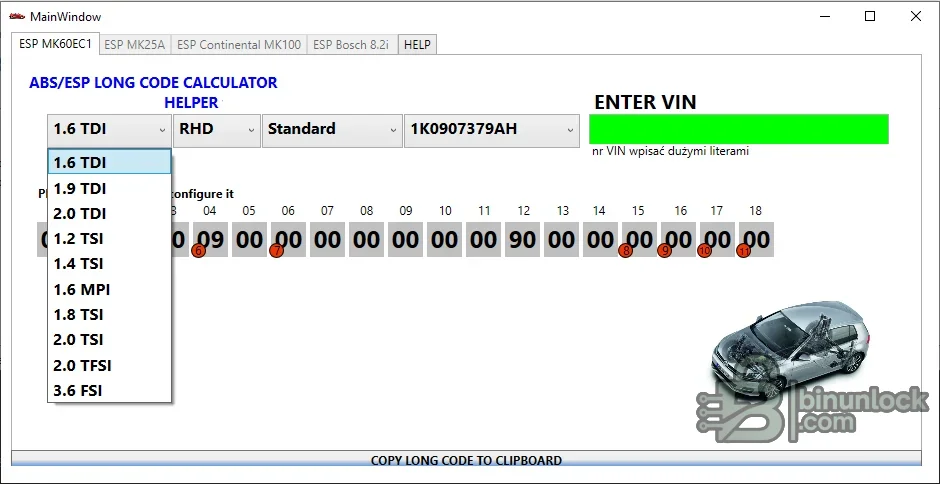
The original screen also exposes tabs for MK25A, Continental MK100 and Bosch 8.2i families, but the primary proven workspace is MK60EC1. A generated code is only a candidate: ABS part number, index, vehicle platform, engine, transmission, brake equipment, steering position and installed options must agree with the actual car and an authoritative scan.
What this resource is for#
Use the calculator to reconstruct or cross-check long coding during an authorized ABS/ESP module replacement or configuration repair. It complements VCDS, ODIS or another suitable diagnostic platform; it does not connect to the vehicle or perform coding by itself.Functions included#
- Select supported engine and vehicle configuration choices
- Choose left- or right-hand-drive configuration where available
- Enter the required VIN-derived information
- Generate and display the ABS/ESP long-coding byte sequence
- Copy the calculated code for use in a separate diagnostic session
- Expose additional controller-family tabs present in the application
- Retain the supplied companion key-generation utility with the functional package
Supported vehicles, controllers and file types#
- Primary interface workspace for VAG MK60EC1 ABS/ESP modules
- Visible engine choices include several TDI, TSI, TFSI, MPI and FSI families
- Additional tabs name MK25A, Continental MK100 and Bosch 8.2i, but exact vehicle coverage is not documented
- Coding varies with vehicle platform, ABS hardware/index and installed equipment
- No claim is made for every Volkswagen, Audi, Škoda or SEAT model using a similarly named brake unit
Package contents#
- ABS/ESP long-code calculator
- Companion key-generation utility retained with the original functional set
- Original application screenshot
- No VCDS, ODIS, diagnostic cable, ABS firmware or coding database export
System, hardware and interface requirements#
- Windows PC or isolated VM
- Complete diagnostic autoscan made before module removal where possible
- Exact ABS controller part number, software/index and vehicle PR-code information
- VCDS, ODIS or compatible professional diagnostic platform
- Stable vehicle battery support and a safe test area for final brake-system checks
Recommended workshop workflow#
- Record the original long coding and full autoscan before replacing the module
- Verify the replacement ABS unit is hardware-compatible
- Enter vehicle, engine, steering and VIN-related data carefully
- Compare the generated bytes with a known-good scan or OEM configuration source
- Write the candidate code through the diagnostic platform under stable voltage
- Complete basic settings, steering-angle and brake-system calibrations required by the repair manual
- Clear faults, perform a controlled road test and rescan all related modules
Compatibility limits and responsible use#
- Never guess safety-critical brake coding from a visually similar vehicle
- A coding value can be accepted by the module yet still describe the wrong equipment
- Different ABS hardware indexes may require different coding logic
- VIN data should be handled privately and not posted in full
- The tool does not replace hydraulic bleeding, basic settings or sensor calibration
Troubleshooting#
- Coding rejected: verify part number, index, platform and diagnostic security access
- Coding accepted but faults remain: complete required basic settings and inspect installed equipment selections
- VIN field fails: confirm the expected format and use only the required characters
- Generated bytes differ from old scan: stop and resolve the configuration difference before writing
- Warning lamps remain: run guided diagnostics and do not drive until the brake system is verified


