
What is xDecoder 14.0?
xDecoder 14.0 is a Windows ECU DTC management and BIN analysis utility designed to detect diagnostic trouble code tables, mask tables and path structures inside supported ECU firmware files.
The software is intended for ECU file analysis and provides automatic DTC table detection for a wide range of Bosch, Delphi, Continental, Siemens and Visteon controllers. Version 14.0 expands the supported ECU database and includes Ford Delphi DCM6.1 support together with additional ECU strategies introduced in recent xDecoder releases.
Key facts
xDecoder 14.0 features
xDecoder analyzes ECU firmware and attempts to locate diagnostic trouble code structures automatically. Depending on the detected ECU strategy, the program can identify DTC tables together with related mask and path locations.
What's new in xDecoder 14.0?
xDecoder 14.0 continues the ECU coverage expansion introduced in the recent releases and adds support for additional Bosch, Delphi, Continental, Siemens and Visteon controllers.
One of the notable additions in version 14.0 is support for Ford vehicles equipped with the Delphi DCM6.1 ECU.
Recent xDecoder releases include support for ECU applications such as:
ECU compatibility can vary depending on the exact hardware number, software version and firmware structure.
Supported ECU manufacturers and families
xDecoder supports DTC analysis across a growing range of ECU manufacturers and firmware strategies.
Common supported groups include:
Support is strategy-dependent. An ECU family may contain different hardware and software revisions with different DTC table structures.
Ford Delphi DCM6.1 support
Ford Delphi DCM6.1 is one of the important ECU additions available in xDecoder 14.0.
When a supported DCM6.1 BIN file is loaded, xDecoder can analyze the firmware and locate compatible DTC structures together with related table information.
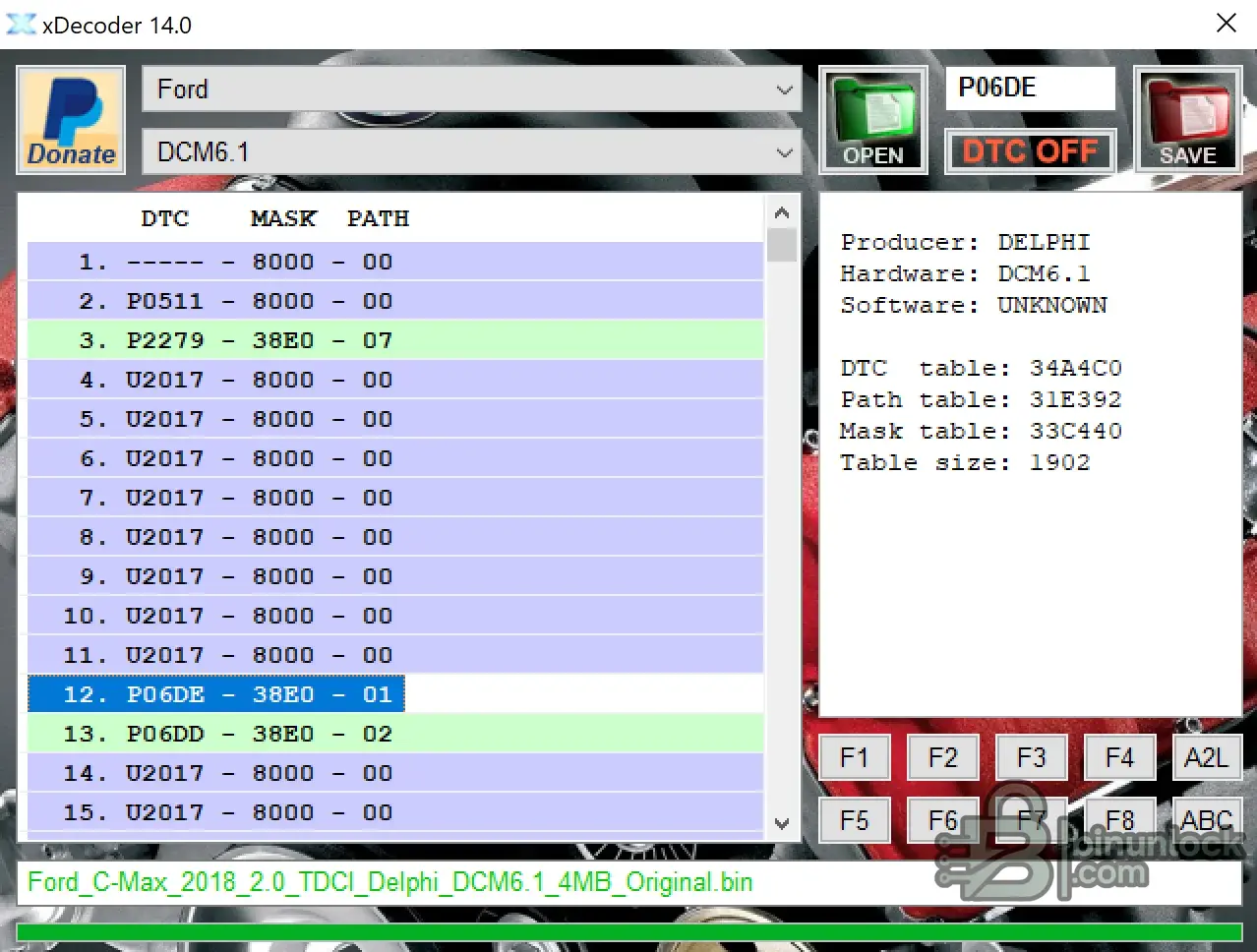
The screenshot above shows xDecoder 14.0 working with a Ford Delphi DCM6.1 ECU file and displaying diagnostic trouble codes including P06DE, P06DD and P2279.
This provides a practical way to inspect DTC locations in supported Ford DCM6.1 firmware without manually searching through the complete binary file.
DTC table, mask and path detection
ECU manufacturers store diagnostic information differently depending on controller family and firmware strategy.
xDecoder is designed to simplify this analysis by searching for supported DTC structures automatically.
Depending on the ECU, the detected information may include:
The detected results should always be reviewed against the exact ECU hardware and software version before any changes are made.
Basic workflow
Compatibility notes
xDecoder ECU coverage depends on the exact controller, hardware revision, software version and binary file layout.
Two ECUs belonging to the same family may use different firmware structures, so automatic detection is not guaranteed for every file.
For reliable ECU analysis:
Windows compatibility
xDecoder is designed for Microsoft Windows environments and can be used on compatible workshop PCs and diagnostic laptops.
Supported operation may depend on the specific xDecoder build and Windows configuration.
xDecoder 14.0 activation and technical support
Questions related to xDecoder activation, HWID, supported ECU files and technical assistance are handled in the dedicated discussion thread.
xDecoder 14.0 - Activation, HWID, ECU Coverage and Technical Support
Use the discussion thread for questions about installation, activation status, ECU compatibility or individual BIN file support.
Important notes
xDecoder is intended for users familiar with ECU firmware, automotive diagnostics and ECU programming procedures.
DTC-related modifications can affect diagnostic reporting and vehicle behavior. Always retain the original ECU firmware and verify any modified file before programming.
Do not modify or disable diagnostic functions required for vehicle safety, emissions compliance or applicable legal requirements.
Disclaimer
xDecoder 14.0 is a Windows ECU DTC management and BIN analysis utility designed to detect diagnostic trouble code tables, mask tables and path structures inside supported ECU firmware files.
The software is intended for ECU file analysis and provides automatic DTC table detection for a wide range of Bosch, Delphi, Continental, Siemens and Visteon controllers. Version 14.0 expands the supported ECU database and includes Ford Delphi DCM6.1 support together with additional ECU strategies introduced in recent xDecoder releases.
Key facts
- Version: 14.0
- Platform: Windows
- Software type: ECU DTC Manager and BIN analysis utility
- Main function: automatic DTC table detection
- Supported file type: ECU binary files (BIN)
- Core functions: DTC table search, mask detection and path mapping
- ECU manufacturers: Bosch, Delphi, Continental, Siemens, Visteon and other supported families
- New in version 14.0: Ford Delphi DCM6.1 support and expanded ECU coverage
xDecoder 14.0 features
xDecoder analyzes ECU firmware and attempts to locate diagnostic trouble code structures automatically. Depending on the detected ECU strategy, the program can identify DTC tables together with related mask and path locations.
- Automatic search for supported DTC tables
- DTC code table detection
- Mask table detection
- Path table detection
- Automatic ECU strategy recognition where supported
- ECU producer information
- Hardware identification
- Software identification
- Detected DTC table size
- Direct inspection of DTC structures inside BIN files
- Support for multiple Bosch and Delphi ECU strategies
- Expanded Continental, Siemens and Visteon coverage
- Save edited ECU binary files while preserving the original read as a backup
What's new in xDecoder 14.0?
xDecoder 14.0 continues the ECU coverage expansion introduced in the recent releases and adds support for additional Bosch, Delphi, Continental, Siemens and Visteon controllers.
One of the notable additions in version 14.0 is support for Ford vehicles equipped with the Delphi DCM6.1 ECU.
Recent xDecoder releases include support for ECU applications such as:
- Delphi DCM6.1 - Ford
- Continental SID211 - Ford
- Bosch MD1CS069 - Iveco
- Bosch MD1CP014 - VAG
- Bosch MD1CS004 - VAG
- Visteon ESU412 - Ford
- Bosch MG1CS201 - BMW
- Bosch MG1CS024 - BMW
- Bosch MG1CS003 - BMW
- Continental EMS3155 - Renault / Nissan / Dacia
- Siemens SID803 - PSA
- Bosch EDC17CP65 - Ford
- Bosch EDC17C45 - Nissan / Renault
ECU compatibility can vary depending on the exact hardware number, software version and firmware structure.
Supported ECU manufacturers and families
xDecoder supports DTC analysis across a growing range of ECU manufacturers and firmware strategies.
Common supported groups include:
- Bosch EDC series
- Bosch EDC17
- Bosch MED series
- Bosch MED17
- Selected Bosch MD1 applications
- Selected Bosch MG1 applications
- Delphi engine control units
- Delphi DCM series
- Delphi DCM6.1
- Selected Continental ECUs
- Selected Siemens ECUs
- Selected Visteon ECUs
Support is strategy-dependent. An ECU family may contain different hardware and software revisions with different DTC table structures.
Ford Delphi DCM6.1 support
Ford Delphi DCM6.1 is one of the important ECU additions available in xDecoder 14.0.
When a supported DCM6.1 BIN file is loaded, xDecoder can analyze the firmware and locate compatible DTC structures together with related table information.
The screenshot above shows xDecoder 14.0 working with a Ford Delphi DCM6.1 ECU file and displaying diagnostic trouble codes including P06DE, P06DD and P2279.
This provides a practical way to inspect DTC locations in supported Ford DCM6.1 firmware without manually searching through the complete binary file.
DTC table, mask and path detection
ECU manufacturers store diagnostic information differently depending on controller family and firmware strategy.
xDecoder is designed to simplify this analysis by searching for supported DTC structures automatically.
Depending on the ECU, the detected information may include:
- Diagnostic trouble code
- DTC table address
- Mask address
- Path address
- ECU producer
- Hardware ID
- Software ID
- Table size
The detected results should always be reviewed against the exact ECU hardware and software version before any changes are made.
Basic workflow
- Read and save the original ECU BIN file
- Create a separate backup of the untouched original
- Open the BIN file in xDecoder 14.0
- Run Auto Search or the appropriate supported strategy
- Review the detected DTC table
- Verify mask and path locations where available
- Confirm that the detected ECU information matches the source file
- Make the required changes only on a working copy
- Save the modified BIN under a new filename
- Verify the file and checksum requirements before programming the ECU
Compatibility notes
xDecoder ECU coverage depends on the exact controller, hardware revision, software version and binary file layout.
Two ECUs belonging to the same family may use different firmware structures, so automatic detection is not guaranteed for every file.
For reliable ECU analysis:
- Use a complete and correctly read ECU binary
- Always preserve the untouched original file
- Check ECU hardware and software identification
- Verify automatically detected DTC structures before editing
- Use the correct read and write method for the ECU
- Handle checksum correction when required by the ECU or flashing tool
- Validate modified files before use
Windows compatibility
xDecoder is designed for Microsoft Windows environments and can be used on compatible workshop PCs and diagnostic laptops.
Supported operation may depend on the specific xDecoder build and Windows configuration.
xDecoder 14.0 activation and technical support
Questions related to xDecoder activation, HWID, supported ECU files and technical assistance are handled in the dedicated discussion thread.
xDecoder 14.0 - Activation, HWID, ECU Coverage and Technical Support
Use the discussion thread for questions about installation, activation status, ECU compatibility or individual BIN file support.
Important notes
xDecoder is intended for users familiar with ECU firmware, automotive diagnostics and ECU programming procedures.
DTC-related modifications can affect diagnostic reporting and vehicle behavior. Always retain the original ECU firmware and verify any modified file before programming.
Do not modify or disable diagnostic functions required for vehicle safety, emissions compliance or applicable legal requirements.
Disclaimer
- User Responsibility. This software and information are provided for diagnostic, educational and evaluation purposes. Users are responsible for complying with applicable laws and regulations.
- ECU Modification Risk. Incorrect ECU firmware modification or programming can cause diagnostic problems, ECU malfunction or an unusable control unit. Always keep a verified original backup and validate modified files before programming.


