
Description
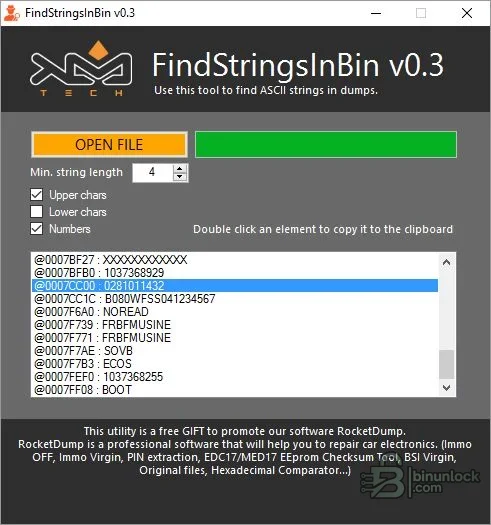
FindStringsInBin is a read-only Windows scanner that extracts human-readable ASCII sequences from ECU and other binary files and lists their byte addresses. It provides a faster first pass for locating software identifiers, calibration labels, part numbers, VIN-like strings or diagnostic text before opening the relevant area in a hex editor.
Supported vehicles, ECUs and files#
Because the tool looks for character runs rather than decoding a specific ECU format, it can inspect many raw binaries. Results are only candidate strings: compressed, encrypted, UTF-16, packed-decimal or checksum-protected values may not appear, while coincidental printable bytes can produce false positives. The address shown is a file offset, not automatically an ECU memory address.- Raw ECU firmware, EEPROM or calibration files that can be opened as ordinary binary data.
- Printable ASCII using the chosen uppercase, lowercase and numeric character filters.
- Any file size the local Windows/.NET environment can load within available memory; no controller-specific database is required.
Functions#
- Set a minimum string length to reduce short, noisy matches.
- Include or exclude uppercase letters, lowercase letters and numbers.
- List every candidate with an address for follow-up in a hex editor.
- Copy an individual result to the clipboard for searching or documentation.
- Inspect without intentionally modifying the input binary.
System and hardware requirements#
- A Windows PC with Microsoft .NET Framework 3.5 or later; available descriptions report both 32-bit and 64-bit Windows use.
- Enough RAM for the chosen binary and a working copy of the source file.
- A hex editor or ECU-analysis tool for validating offsets and surrounding structure.
- Controller documentation when a string will be interpreted as an identifier or calibration field.
Recommended workflow#
- Hash the binary and work from a copy even though the scanner is read-only.
- Start with a longer minimum length and alphanumeric filters, then broaden only if necessary.
- Open interesting offsets in a hex editor and check terminators, encoding and nearby structure.
- Confirm any VIN, PIN, software number or label independently before using it in a service decision.


