
VAGTool is a compact diagnostic utility for compatible Volkswagen Group control modules that communicate through the older K-line KWP1281 protocol. It provides direct control over the serial port, baud rate, module address and diagnostic command, making it useful for focused work on vehicles that predate modern CAN and UDS diagnostic platforms.
The genuine interface lists engine, cluster, comfort-control and radio targets together with fault-code, software-identification, adaptation, basic-setting and scan commands. It is intended for technicians who already understand VAG controller addresses and channel procedures; it is not a guided dealer-level diagnostic suite.
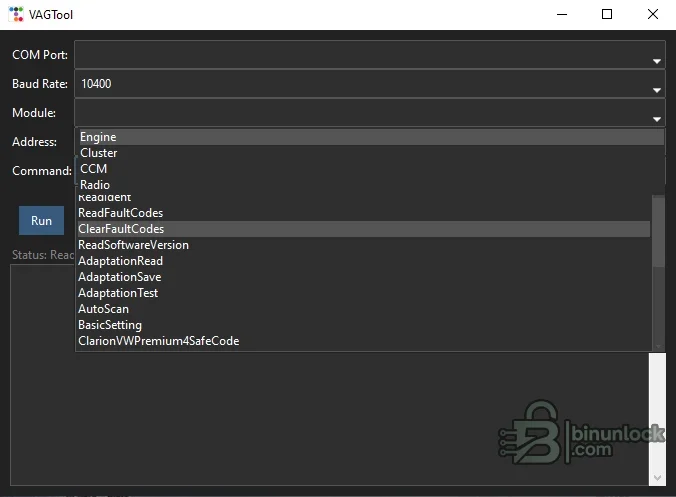
The interface also exposes a dedicated safe-code command for a supported Clarion VW Premium radio workflow. Treat it as a model-specific function rather than a universal radio-code calculator.
Later CAN, TP2.0, KWP2000-over-CAN and UDS modules are outside the core design of this utility. Compatibility must be confirmed by vehicle wiring, module address and protocol rather than by connector shape alone.
The supplied program defaults to the common K-line communication rate shown in the interface, but the correct baud rate can vary by module. Avoid generic Bluetooth ELM327 interfaces unless they explicitly provide the transparent K-line behavior required by the software.
Security and radio-code functions must be used only for authorized service. Do not post PINs, key data, customer VINs or other protected values in the public discussion.
If fault text is incomplete, record the numeric VAG code and verify it against model-specific service information. After an interrupted adaptation, restore the original value before attempting another change.
The genuine interface lists engine, cluster, comfort-control and radio targets together with fault-code, software-identification, adaptation, basic-setting and scan commands. It is intended for technicians who already understand VAG controller addresses and channel procedures; it is not a guided dealer-level diagnostic suite.
Modules and commands visible in the program#
- Engine
- Instrument cluster
- Comfort Control Module
- Radio and selected radio-security operation
- Read fault codes and clear fault codes
- Read software version
- Read, save and test adaptation channels
- Automatic scan
- Basic settings
- Module-address and custom-command entry
The interface also exposes a dedicated safe-code command for a supported Clarion VW Premium radio workflow. Treat it as a model-specific function rather than a universal radio-code calculator.
Vehicle and protocol compatibility#
KWP1281 was used by many older Volkswagen, Audi, Seat and Skoda controllers over a single K-line, including vehicles that may have a 16-pin diagnostic connector but do not implement generic OBD-II communication for every module. Earlier models can require a VAG 2x2 adapter in addition to the K-line interface.Later CAN, TP2.0, KWP2000-over-CAN and UDS modules are outside the core design of this utility. Compatibility must be confirmed by vehicle wiring, module address and protocol rather than by connector shape alone.
Interface and system requirements#
- Windows computer capable of running a legacy 32-bit application
- A compatible KKL or K-line diagnostic interface with a reliable COM port
- VAG 2x2 adapter where required by the vehicle
- Correct USB-to-serial driver when a virtual COM port is used
- Stable vehicle battery voltage
- Known controller address and documented adaptation or basic-setting procedure
The supplied program defaults to the common K-line communication rate shown in the interface, but the correct baud rate can vary by module. Avoid generic Bluetooth ELM327 interfaces unless they explicitly provide the transparent K-line behavior required by the software.
Recommended connection workflow#
- Identify the vehicle year, platform, module and diagnostic connector arrangement.
- Install the interface driver and verify its COM-port number in Windows.
- Connect battery support and switch the ignition as required by the service procedure.
- Select the exact COM port, communication rate, module and address.
- Begin with software identification or fault-code reading before any adaptation.
- Record original adaptation values and coding before making a change.
- Run only the documented channel or basic setting for the exact controller.
- Cycle the ignition if required, rescan and verify the affected system.
Adaptation and basic-setting cautions#
An accepted channel number does not prove that the entered value is valid for the vehicle. Incorrect adaptation can disable convenience functions, disturb throttle or idle learning, change cluster behavior or create immobilizer problems. Record every original value and never experiment on a customer vehicle without a recovery plan.Security and radio-code functions must be used only for authorized service. Do not post PINs, key data, customer VINs or other protected values in the public discussion.
Troubleshooting communication#
If the controller does not respond, confirm ignition state, K-line continuity, ground, interface voltage levels, COM-port assignment and whether the selected module actually uses KWP1281. A vehicle can expose generic engine OBD while other modules use a different proprietary protocol. Disable other software that may already have the serial port open.If fault text is incomplete, record the numeric VAG code and verify it against model-specific service information. After an interrupted adaptation, restore the original value before attempting another change.


